





A fast library for reading, writing, and modifying STL files, powered by NumPy. Every mesh operation uses vectorized array math for speed.
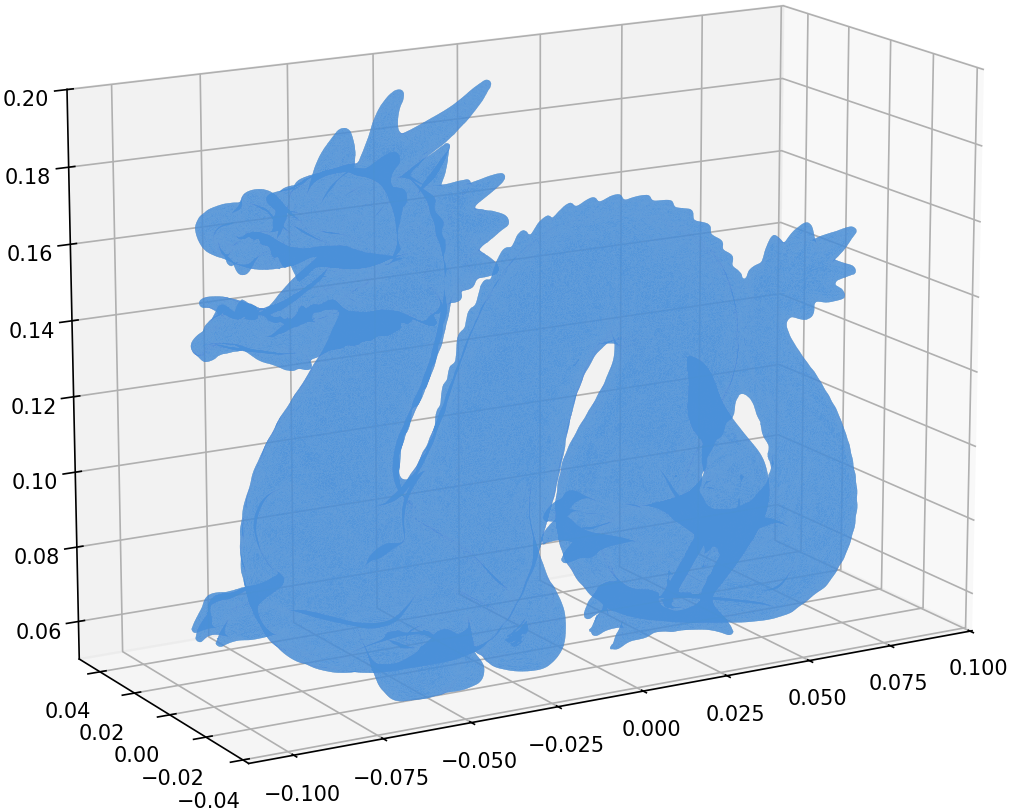
Stanford Dragon — 871,414 triangles loaded in 0.63s, rendered with matplotlib
pip install numpy-stlfrom stl import mesh
# Load an STL file (auto-detects binary/ASCII)
your_mesh = mesh.Mesh.from_file('model.stl')
# Inspect
print(f'{len(your_mesh)} triangles')
print(f'Bounding box: {your_mesh.min_} to {your_mesh.max_}')
# Save
your_mesh.save('output.stl')- Read and write binary and ASCII STL files
- Read PLY and 3MF files (3MF is experimental, read-only)
- Mesh operations: rotate, translate, transform (4x4 matrix)
- Properties: surface area, volume, center of gravity, inertia tensor, convexity
- Combine multiple meshes by concatenating data arrays
- CLI tools:
stl,stl2ascii,stl2binfor format conversion - Fast: all operations backed by NumPy vectorized math
| Format | Read | Write | Notes |
|---|---|---|---|
| STL (binary) | ✅ | ✅ | Auto-detected on load |
| STL (ASCII) | ✅ | ✅ | ~5x faster with optional speedups |
| PLY | ✅ | ✅ | Binary and ASCII; from_ply_file / save_ply |
| 3MF | ✅ | — | Experimental; from_3mf_file |
- Python: 3.10+
- NumPy: 1.24+ (installed automatically)
- Platforms: Linux, macOS, Windows
- Optional:
numpy-stl[fast]for the Cython ASCII speedups (see below)
numpy-stl is fast out of the box. For even faster ASCII STL I/O, install the optional Cython speedups:
pip install numpy-stl[fast]This installs the speedups
package, a compiled C extension for ASCII parsing. The library works
identically without it -- pure Python is the default.
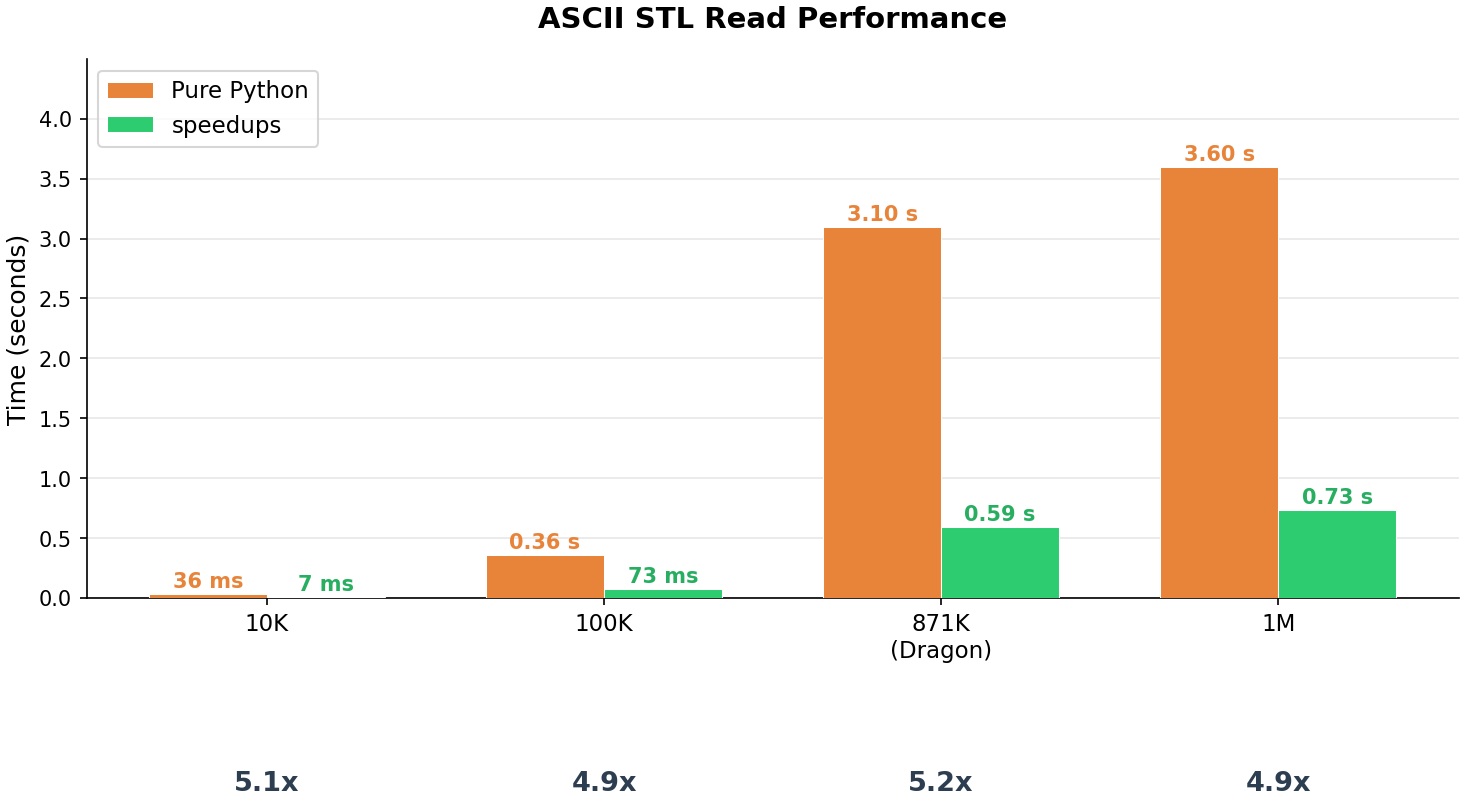
ASCII STL read performance — ~5x faster with the speedups C extension, consistent across data sizes (median of 5 runs):
| Facets | Pure Python | Speedups | Factor |
|---|---|---|---|
| 10,000 | 36 ms | 7 ms | 5.1x |
| 100,000 | 0.36 s | 73 ms | 4.9x |
| 871,414 | 3.10 s | 0.59 s | 5.2x |
| 1,000,000 | 3.60 s | 0.73 s | 4.9x |
Note: Results will vary by hardware. Run the benchmark yourself:
python benchmarks/benchmark_ascii_read.py
import numpy as np
from stl import mesh

# Define vertices and faces of a cube
vertices = np.array([
    [-1, -1, -1], [+1, -1, -1], [+1, +1, -1], [-1, +1, -1],
    [-1, -1, +1], [+1, -1, +1], [+1, +1, +1], [-1, +1, +1],
])
faces = np.array([
    [0, 3, 1], [1, 3, 2], [0, 4, 7], [0, 7, 3],
    [4, 5, 6], [4, 6, 7], [5, 1, 2], [5, 2, 6],
    [2, 3, 6], [3, 7, 6], [0, 1, 5], [0, 5, 4],
])

cube = mesh.Mesh(np.zeros(faces.shape[0], dtype=mesh.Mesh.dtype))
for i, f in enumerate(faces):
    for j in range(3):
        cube.vectors[i][j] = vertices[f[j], :]

cube.save('cube.stl')import math
from stl import mesh
m = mesh.Mesh.from_file('model.stl')
m.rotate([0, 0, 1], math.radians(90))
m.translate([10, 0, 0])
m.save('transformed.stl')from stl import mesh
m = mesh.Mesh.from_file('closed_model.stl')
volume, cog, inertia = m.get_mass_properties()
print(f'Volume: {volume:.4f}')
print(f'Center of gravity: {cog}')import numpy as np
from stl import mesh
m1 = mesh.Mesh.from_file('part1.stl')
m2 = mesh.Mesh.from_file('part2.stl')
combined = mesh.Mesh(np.concatenate([m1.data, m2.data]))
combined.save('combined.stl')import math
from stl import mesh
from mpl_toolkits import mplot3d
from matplotlib import pyplot
figure = pyplot.figure(figsize=(8, 6))
axes = figure.add_subplot(projection='3d')
dragon = mesh.Mesh.from_ply_file('dragon_vrip.ply')
dragon.rotate([1, 0, 0], math.radians(-90))
axes.add_collection3d(
mplot3d.art3d.Poly3DCollection(dragon.vectors)
)
scale = dragon.points.flatten()
axes.auto_scale_xyz(scale, scale, scale)
pyplot.show()Assumes import math, import numpy as np, from stl import mesh, and
from stl import Mode (for the ASCII save).
| Task | Call |
|---|---|
| Load (auto-detect) | mesh.Mesh.from_file('m.stl') |
| Load PLY | mesh.Mesh.from_ply_file('m.ply') |
| Load 3MF (experimental) | list(mesh.Mesh.from_3mf_file('m.3mf')) |
| Save (auto/format) | m.save('out.stl') |
| Save as ASCII | m.save('out.stl', mode=Mode.ASCII) |
| Save PLY | m.save_ply('out.ply') |
| Rotate (axis, radians) | m.rotate([0, 0, 1], math.radians(90)) |
| Translate | m.translate([x, y, z]) |
| Transform (4x4 matrix) | m.transform(matrix) |
| Bounding box | m.min_, m.max_ |
| Mass properties | volume, cog, inertia = m.get_mass_properties() |
| With density | vol, mass, cog, inertia = m.get_mass_properties_with_density(d) |
| Combine meshes | mesh.Mesh(np.concatenate([a.data, b.data])) |
# Convert ASCII to binary
stl2bin input.stl output.stl

# Convert binary to ASCII
stl2ascii input.stl output.stl

# Auto-detect and convert
stl input.stl output.stlFull documentation is available at numpy-stl.readthedocs.io.
Contributions are welcome! See CONTRIBUTING.md for the development setup guide.
BSD-3-Clause